Build Your Own Local Chat AI on a Home PC: No Cloud, No Subscriptions, Full Privacy
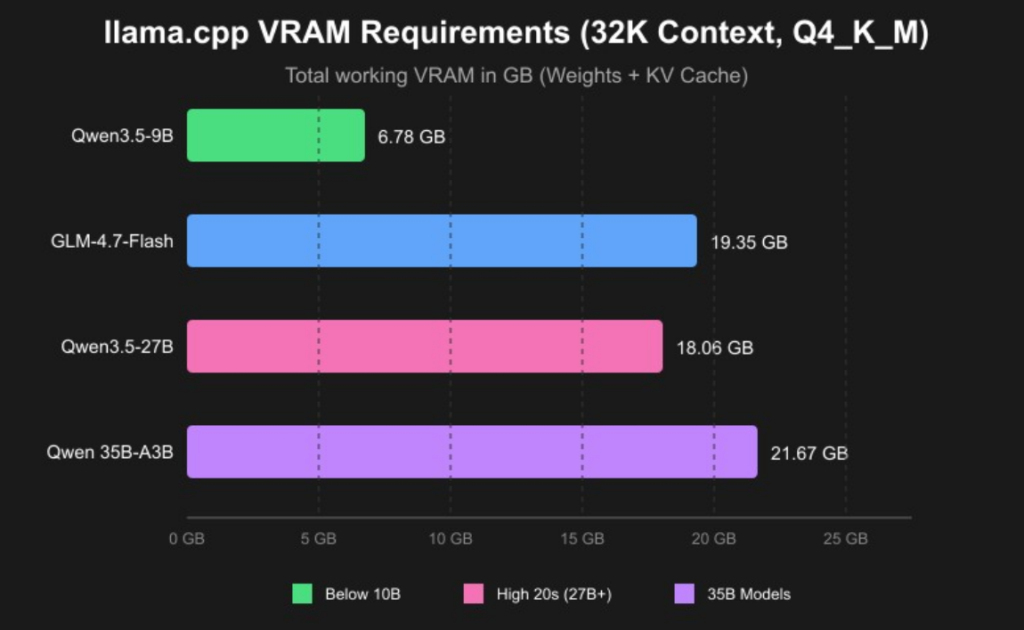
As an AI solutions technician who spends 40+ hours a week debugging enterprise AI deployments, I’ll let you in on a secret: you don’t need a $10,000 server farm or a monthly ChatGPT Plus subscription to run a powerful chat AI at home. Over the past 6 months, I’ve built and tested half a dozen local AI setups on consumer hardware, and I’m here to show you exactly how to do it in under 30 minutes—no PhD required. I started building local AIs for one simple reason: privacy. I got tired of worrying about sensitive work notes, personal projects, or family information being uploaded to cloud servers. With a local AI, everything stays on your PC. No data leaves your machine, no one can read your conversations, and you can use it completely offline. Plus, it’s 100% free after the initial hardware investment. What You’ll Need: Hardware Breakdown The good news is that modern consumer GPUs are more than capable of running state-of-the-art chat models. Below is the hardware tier breakdown I recommend based on my own testing, paired with the latest VRAM requirements for popular 2026 models: Figure 1: 2026 Local LLM VRAM Requirements (Q4_K_M Quantization, 32K Context) Based on these requirements, here are my tiered recommendations for different use cases: A quick note: NVIDIA GPUs are still the best choice for local AI because of their superior CUDA support. AMD GPUs work with some tools, but you’ll run into more compatibility issues. For laptops, look for models with at least 16GB of unified RAM and an RTX 4050 or higher. The Simplest Software Stack: Ollama + Open WebUI Forget about complex Docker setups, Python dependency hell, or compiling models from source. The easiest way to run a local AI today is using Ollama as your backend and Open WebUI as your frontend. This combination works out of the box on Windows, macOS, and Linux. Ollama is a lightweight tool that handles all the messy parts of running AI models: model downloading, quantization, GPU acceleration, and inference. Open WebUI is a beautiful, feature-rich web interface that looks and works just like ChatGPT. It supports chat history, multiple models, custom prompts, and even file uploads. Figure 2: Ollama + Open WebUI Software Stack Architecture Step-by-Step Setup Guide I’ve walked dozens of colleagues through this process, and most people finish in under 20 minutes. Here’s exactly what to do: That’s it! You now have a fully functional chat AI running entirely on your home PC. Pro Tips for Better Performance After running local AIs for months, here are the tricks that make the biggest difference: Common Pitfalls & Fixes What’s Next? Once you have your basic setup running, the possibilities are endless. You can fine-tune models on your own data to create a personal AI assistant, add plugins for web search and file analysis, or even run multiple models side by side. I’ve even set up my local AI to control my smart home devices and automate my morning routine. Building a local chat AI is easier than you think, and it’s incredibly rewarding. Not only do you get full privacy and control, but you also learn a lot about how AI actually works under the hood. Give it a try this weekend—you’ll be amazed at what you can do with a regular home PC and a little bit of time.
Build Your Own Local Chat AI on a Home PC: No Cloud, No Subscriptions, Full Privacy Read More »