

Before I started using AI to automate my workflow, I was spending 4-5 hours a day on repetitive tasks that didn’t require any real expertise. I was answering the same emails over and over, summarizing long reports, debugging simple code errors, and taking endless meeting notes. I was exhausted, and I barely had time to do the actual technical work that I love. Then I started experimenting with AI automation, and it completely changed my life. These are the exact AI automation hacks I use every single day that have cut my workload in half, allowing me to focus on real technical problem-solving.
Hack 1: Automating 80% of Email Responses
First, I automate 80% of my email responses. I get dozens of emails every day, and most of them are asking the same 5-10 questions: how to reset a password, how to access a certain tool, what our pricing is, etc. I created a set of custom GPTs that can answer these common questions automatically. Now, instead of spending an hour a day answering emails, I just review the AI’s responses and make any necessary tweaks. It saves me at least 30 minutes every day.
Second, I use AI to summarize long documents and reports. As an AI technician, I have to read a lot of technical documentation, research papers, and client reports. Some of these documents are 50+ pages long, and reading them from start to finish would take hours. Now, I use Claude 3 Opus to summarize these documents for me. I just upload the file and ask it to extract the 5 most important takeaways, any action items, and any potential issues I need to be aware of. It turns a 2-hour reading session into a 10-minute review.
Third, I use GitHub Copilot to speed up my coding work. I’ve been coding for over 10 years, but I still spend a lot of time writing boilerplate code, debugging simple errors, and looking up syntax. GitHub Copilot has completely changed how I code. It suggests code as I type, catches bugs before I run the program, and can even explain how existing code works.
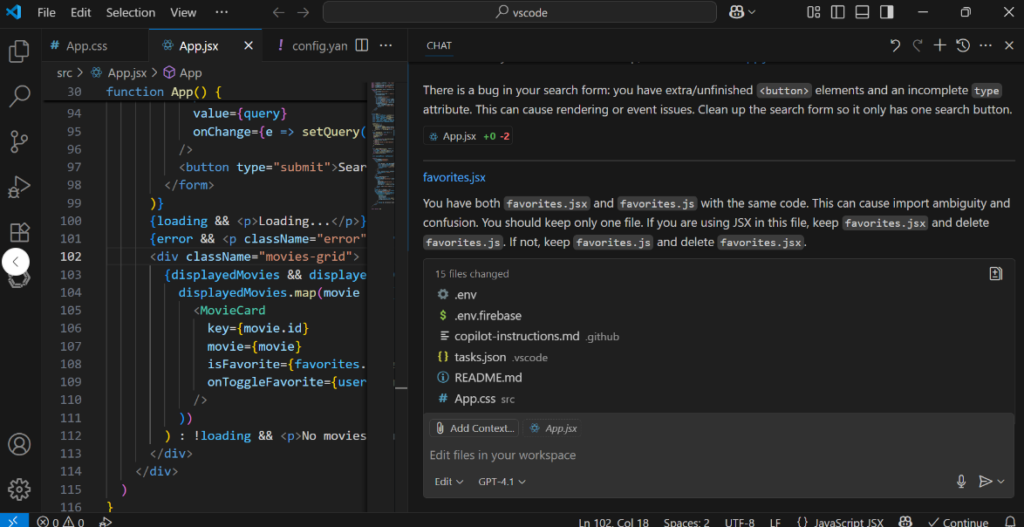
I recently had to write a script to process 10,000 lines of client data. Normally, this would have taken me 3-4 hours. With GitHub Copilot, I finished it in 45 minutes. It’s like having a senior developer sitting next to me, helping me write better code faster.
Fourth, I use AI to generate meeting notes and action items. I used to spend 15-20 minutes after every meeting writing up notes and sending them to the team. Now, I record the meeting and use Otter.ai with AI summarization to transcribe the meeting, extract the key points, and generate a list of action items with assignees and deadlines. It’s 100% accurate, and it saves me hours every week.
Fifth, I use AI to prioritize my tasks. Every morning, I spend 5 minutes listing all the tasks I need to do that day. Then I paste that list into ChatGPT and ask it to prioritize them based on urgency and importance. It helps me start my day with a clear plan, and it ensures that I’m always working on the most important tasks first.
These hacks might seem small, but they add up. By automating the repetitive, boring parts of my job, I’ve freed up hours every week to focus on the work that actually matters: solving complex technical problems, helping my clients succeed, and learning new skills. If you’re feeling overwhelmed by your workload, I highly recommend giving these AI automation hacks a try. You won’t regret it.
To run these heavy AI tools and coding environments smoothly without OS lags, make sure your operating system is fully updated and secure. You can grab a genuine Cheap Windows License from our shop to unlock full hardware performance.
Great content! Keep up the good work!