
The single biggest lesson we’ve learned? High-level prompt engineering is key, because the quality of your AI output depends entirely on the quality of your instructions.
We’ve seen teams waste 10+ hours a week reworking generic AI content, making costly factual errors, or abandoning AI entirely because they “couldn’t get it to work right.” The problem wasn’t the tool—it was the instruction. Today, we’re sharing our standardized enterprise prompt framework and optimization techniques that have helped early adopters cut their AI-related workload by 42% on average.
Our Standardized RCTRO Prompt Framework
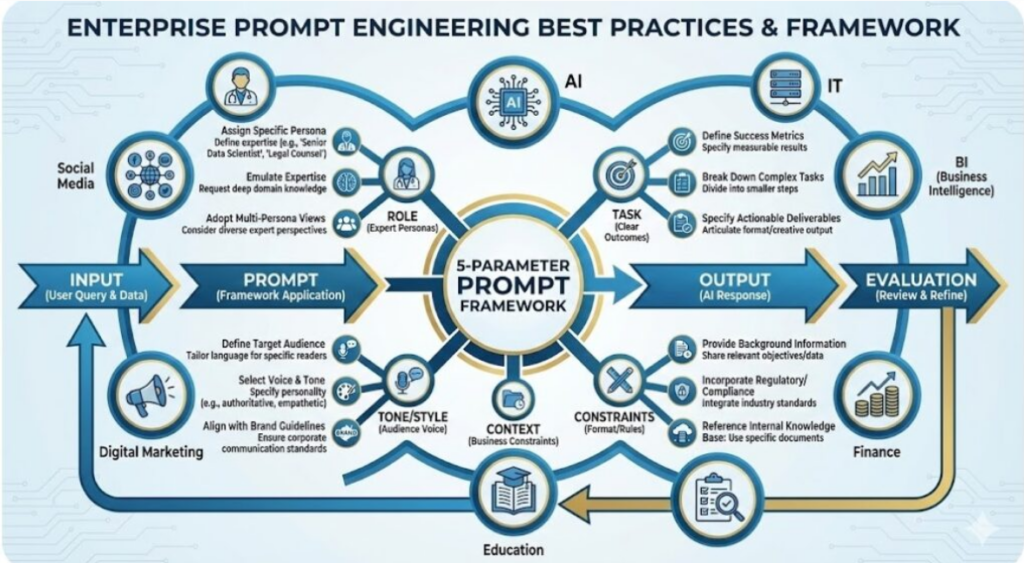
To ensure consistency across teams, we’ve adopted the RCTRO framework—this is the exact structure we use for all internal AI workflows. It eliminates ambiguity and tells the AI exactly what you need, in the order it processes information best.
Figure 1: Enterprise RCTRO Prompt Framework
-
- Role: Define the AI’s professional identity first. This sets the tone, expertise level, and perspective.
-
 Bad: “Write an email”
-
 Good: “You are a senior customer success manager with 8 years of experience supporting enterprise SaaS clients”
-
- Role: Define the AI’s professional identity first. This sets the tone, expertise level, and perspective.
-
- Context: Provide all relevant background information the AI needs. This is the most commonly skipped step—and the biggest cause of bad results.
-
- Task: State clearly and specifically what you want the AI to do. Avoid vague verbs like “optimize” or “improve.”
-
- Requirements: List non-negotiable rules, constraints, and quality standards. Include what NOT to do.
-
- Output Format: Specify exactly how you want the response structured (bullets, tables, sections, word count).
Before & After: Real-World Enterprise Examples
The difference between a bad prompt and a good prompt is night and day. Below is a side-by-side comparison from our marketing team’s recent campaign:
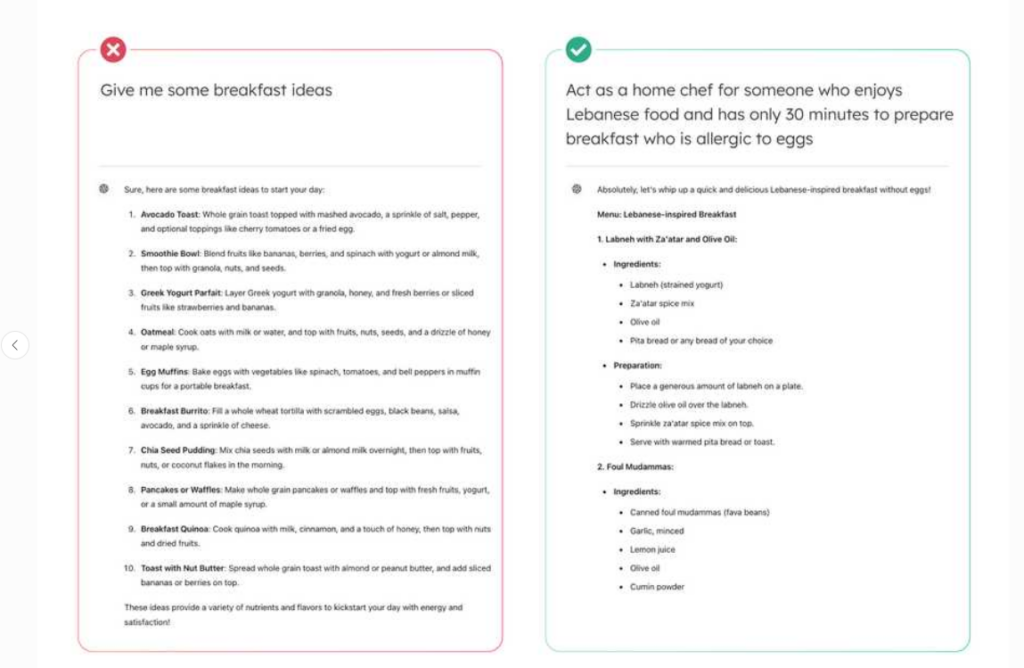
Figure 2: Bad vs. Good Prompt Comparison (Adapted for Enterprise Use)
-
- Bad Prompt (Took 5 revisions to get right):
“Write a social media post about our new project management tool.”
-
- Good Prompt (Got usable first draft):
“You are our B2B social media manager specializing in LinkedIn content. Write a 150-word LinkedIn post announcing our new project management tool for construction companies. Focus on how it reduces project delays by 30% and cuts administrative time by 15 hours per week. Include a statistic from our 2026 customer survey, mention our free 14-day trial, and end with a question to encourage engagement. Keep the tone professional but approachable, and avoid industry jargon. Format it with 2 short paragraphs and 3 relevant hashtags at the end.”
3 Advanced Optimization Tips for Enterprise Users
-
- Use chain prompting for complex tasks: Don’t ask the AI to do everything in one prompt. Break large projects into sequential steps. For example:
-
- Step 1: “Analyze this customer feedback spreadsheet and identify the top 5 most common complaints.”
-
- Step 2: “For each complaint, write 3 actionable solutions that our product team can implement within 90 days.”
-
- Step 3: “Summarize these findings into a 1-page executive report for the leadership team.”
-
- Use chain prompting for complex tasks: Don’t ask the AI to do everything in one prompt. Break large projects into sequential steps. For example:
-
- Add few-shot examples: If you need the AI to follow a very specific format or tone, include 1-2 examples of what you want. This is especially useful for financial reports, technical documentation, and internal memos.
-
- Always include negative prompts: Tell the AI what NOT to do to avoid common pitfalls. For example: “Do not make up any facts or statistics. If you don’t know the answer, say ‘I do not have enough information to answer this question.’ Do not use bullet points for the executive summary.”
Enterprise Best Practices & Next Steps
-
- Never input sensitive data: This includes customer PII, financial projections, internal product roadmaps, and confidential company information. Use only our approved enterprise AI tools, not consumer versions.
-
- Build your team’s prompt library: We’ve created a shared folder on SharePoint where all teams can save and reuse high-performing prompts. This ensures consistency and reduces redundant work.
-
- Test and iterate: Even the best prompts may need tweaking. If you don’t get the result you want, adjust one element at a time (usually the requirements or output format) rather than rewriting the entire prompt.
Action Item for This Week: Each team member should take 3 prompts you use regularly, rewrite them using the RCTRO framework, and share them in your department’s prompt library by Friday. If you need help refining any prompts, reach out to the AI solutions team—we’re here to provide one-on-one support.
By mastering these simple techniques, you’ll be able to leverage AI to automate repetitive tasks, improve your productivity, and focus on the high-value work that matters most.